Every relational database says it’s ACID compliant, and it’s easy to read that as “they all give you the same guarantees”. They don’t. Postgres and MySQL disagree on what REPEATABLE READ means. MariaDB changed its answer in a recent release. SQLite ignores foreign keys unless you ask for them, and MySQL ignored CHECK constraints for most of its history. A commit in any of them can be lost after a power cut if one setting is wrong, and the database will still tell you it’s ACID.
So this post goes through the four letters one at a time. For each one I’ll cover what it means, how the engines actually implement it, and where they behave differently. I’ll mostly compare SQLite, Postgres, MySQL and MariaDB (both with InnoDB, which is what you get by default), and bring in SQL Server, Oracle and MongoDB where they do something worth knowing about.
I’ll use two small tables for the examples:
CREATE TABLE account (
  id      int PRIMARY KEY,
  balance int NOT NULL
);
INSERT INTO account VALUES (1, 1000), (2, 500);

CREATE TABLE sales (
  pid   int PRIMARY KEY,
  qnt   int NOT NULL,
  price int NOT NULL
);
INSERT INTO sales VALUES (1, 10, 5), (2, 20, 4);
What a transaction is
A transaction is a group of statements that the database treats as one unit of work. Sending $100 from account 1 to account 2 is three statements:
BEGIN;
SELECT balance FROM account WHERE id = 1;          -- 1000, enough
UPDATE account SET balance = balance - 100 WHERE id = 1;
UPDATE account SET balance = balance + 100 WHERE id = 2;
COMMIT;
A transaction ends in one of three ways:
COMMIT: the changes become permanent and visible to everyone else.ROLLBACK: the changes are thrown away as if they never happened.- Something breaks before either one: the client disconnects, the server crashes, the power goes out. The database has to treat this as a rollback.
If you don’t write BEGIN, every statement runs in its own little transaction and commits by itself. This is called autocommit, and it’s the default in all four databases. In MySQL and MariaDB you can turn it off with SET autocommit = 0, after which a transaction starts on your first statement and stays open until you commit. That’s a common source of “why is my table locked” questions, because someone’s session has been sitting inside an open transaction for an hour.
Transactions aren’t only for writes. A read-only transaction is useful when you need several queries to agree with each other, for example a report that reads totals from five tables. Without a transaction, each query can see a slightly different state of the database. With the right isolation level, they all see the same snapshot. More on that in the isolation section.
Atomicity
Atomicity means a transaction happens completely or not at all. There’s no state where the first UPDATE happened and the second didn’t.
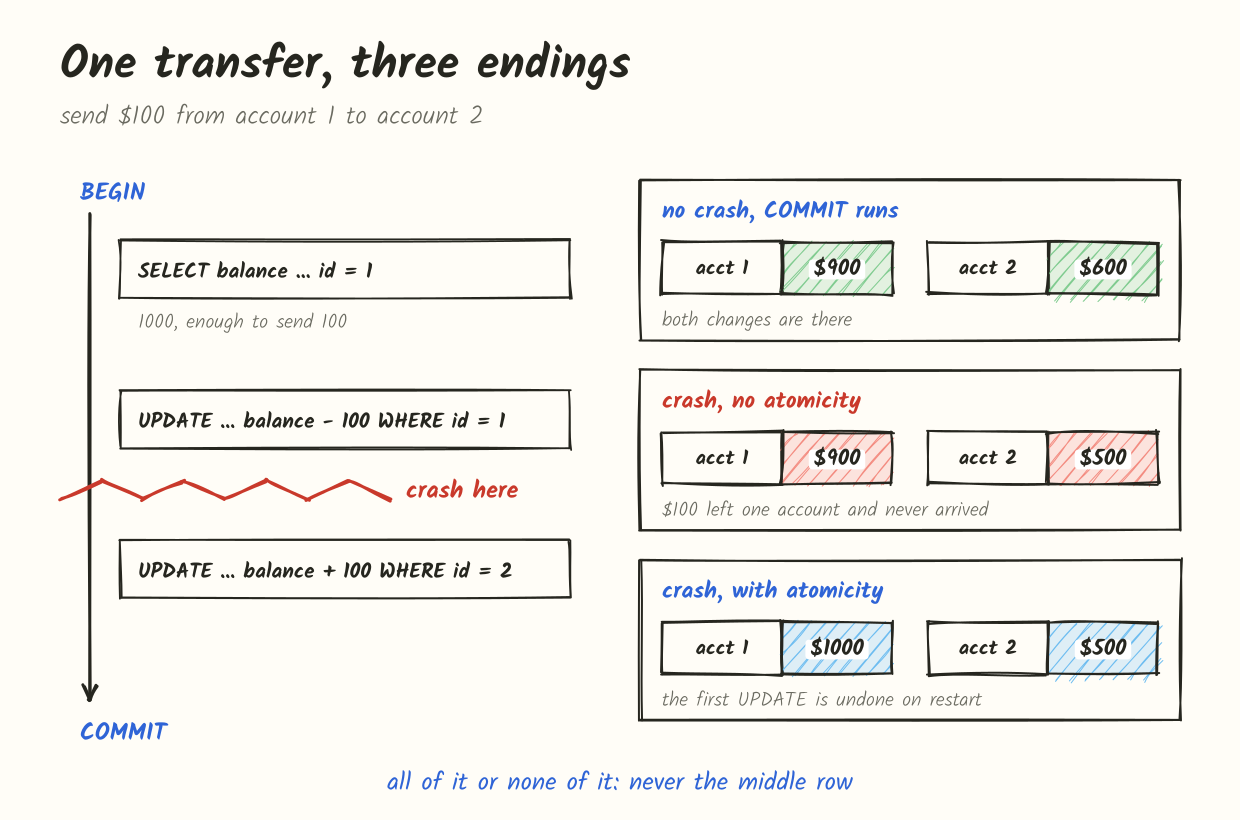
The crash case is the one people think about, but the more common case is much less dramatic: a statement in the middle of your transaction fails. A unique constraint is violated, a value is out of range, a lock wait times out. What happens next depends on the database, and this is the first place where they disagree.
Postgres aborts the whole transaction. After any error, every following statement is refused until you end the transaction:
BEGIN;
UPDATE account SET balance = balance - 100 WHERE id = 1;
INSERT INTO account VALUES (2, 0);
-- ERROR:  duplicate key value violates unique constraint "account_pkey"
UPDATE account SET balance = balance + 100 WHERE id = 2;
-- ERROR:  current transaction is aborted, commands ignored until end of transaction block
COMMIT;
-- ROLLBACK
Notice the last line. You typed COMMIT, and Postgres answered ROLLBACK. Nothing from this transaction was saved. If you want to recover from an expected error and keep going, you use a savepoint:
BEGIN;
UPDATE account SET balance = balance - 100 WHERE id = 1;
SAVEPOINT before_insert;
INSERT INTO account VALUES (2, 0);           -- fails
ROLLBACK TO SAVEPOINT before_insert;         -- only the INSERT is undone
UPDATE account SET balance = balance + 100 WHERE id = 2;
COMMIT;                                      -- both UPDATEs are saved
MySQL and MariaDB only roll back the statement that failed. The transaction stays open, and everything before the error is still there:
START TRANSACTION;
UPDATE account SET balance = balance - 100 WHERE id = 1;
INSERT INTO account VALUES (2, 0);
-- ERROR 1062 (23000): Duplicate entry '2' for key 'PRIMARY'
COMMIT;
-- Query OK: the first UPDATE is committed
If your application code catches the error, logs it and carries on to COMMIT, you just committed half a transfer. The database did exactly what it promised: each statement was atomic, and the transaction was committed because you asked. It’s the application’s job to call ROLLBACK when something fails. Most drivers and ORMs do this for you inside a transaction { ... } block, but hand-written code often doesn’t.
There’s one more trap here. When an InnoDB lock wait times out (innodb_lock_wait_timeout, 50 seconds by default), only the waiting statement is rolled back, not the transaction. A deadlock, on the other hand, rolls back the whole transaction. If you want timeouts to behave like deadlocks, set innodb_rollback_on_timeout = ON, which needs a server restart.
SQLite by default behaves like MySQL. A failed statement is undone, the transaction stays active, and earlier statements are kept. SQLite lets you change this per constraint or per statement with its conflict clause, for example INSERT OR ROLLBACK INTO ..., which rolls back the entire transaction on a conflict.
DDL inside transactions
Can you roll back a CREATE TABLE or an ALTER TABLE?
- Postgres: yes. Almost all DDL is transactional, so a migration that creates three tables and fails on the fourth leaves nothing behind. A few commands like
CREATE INDEX CONCURRENTLYandVACUUMrefuse to run inside a transaction block. - SQLite: yes. DDL is transactional too.
- MySQL and MariaDB: no. DDL statements cause an implicit commit before and after they run. If you
BEGIN, insert some rows, and thenALTER TABLE, the inserts are committed right there and your laterROLLBACKcan’t touch them. Since MySQL 8.0 (and MariaDB 10.6) a single DDL statement is atomic, so a crash in the middle ofALTER TABLEwon’t leave the table half-changed, but a migration made of several DDL statements still isn’t.
This is why migration tools for MySQL are careful to run one change at a time, and why a failed migration on MySQL can leave you with a schema that’s neither the old version nor the new one.
Tables that don’t do transactions at all
MySQL and MariaDB have more than one storage engine, and not all of them are transactional. MyISAM is still there, and MariaDB also ships Aria, which is crash-safe but doesn’t support multi-statement rollback either. If a transaction touches an InnoDB table and a MyISAM table and then rolls back, the InnoDB changes are undone and the MyISAM changes stay, with just a warning:
Warning 1196: Some non-transactional changed tables couldn't be rolled backIn practice you’ll mostly meet this in old schemas. It’s worth a quick check though:
SELECT table_schema, table_name, engine
FROM information_schema.tables
WHERE engine <> 'InnoDB' AND table_schema NOT IN
  ('mysql', 'information_schema', 'performance_schema', 'sys');
How each engine takes a write back
To undo a transaction, the database needs to know what the data looked like before. The three engines keep that information in very different places.
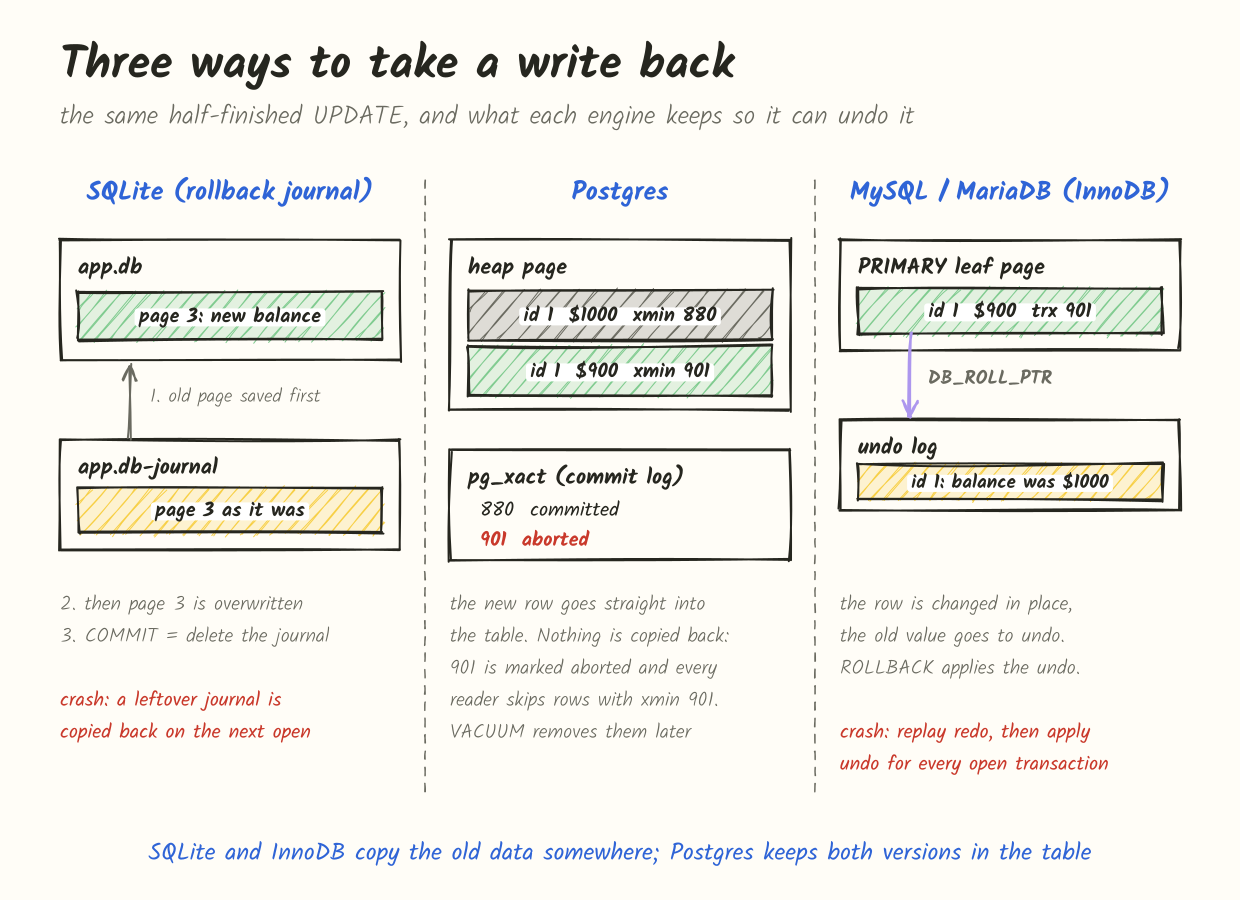
SQLite in its default rollback journal mode copies the original content of every page it’s about to change into a separate file, app.db-journal, and syncs that file to disk before touching the database file. Then it writes the changes straight into app.db. Committing is deleting (or truncating, or zeroing the header of) the journal. If the process dies halfway, the next connection that opens the database finds a “hot” journal and copies the original pages back. The database file is only ever in the old state or the new state, as far as anyone can tell.
In WAL mode (PRAGMA journal_mode = WAL), it works the other way round. The database file isn’t touched during the transaction. New versions of pages are appended to app.db-wal, and a commit is a special frame at the end of that log. A reader that finds a WAL without the commit frame simply ignores the unfinished part. Every so often a checkpoint copies the pages from the WAL back into the main file.
Postgres doesn’t copy anything back, because it never overwrites a row. An UPDATE writes a new version of the row next to the old one and stamps it with the transaction id, called xmin. Whether that version counts depends on one bit of information: did transaction 901 commit? That’s recorded in pg_xact (the commit log), two bits per transaction. A rollback just marks 901 as aborted. A crash does the same thing implicitly, since 901 never got a commit record. Every reader that later finds a row with xmin = 901 checks the commit log, sees it didn’t commit, and skips it. The dead rows stay in the table until VACUUM removes them.
This is why a rollback in Postgres is nearly instant no matter how much the transaction wrote. The downside is that all those aborted rows take space until vacuum gets to them.
InnoDB (MySQL and MariaDB) changes the row in place. Before it does, it writes the old values into an undo log and links the row to that undo record with a hidden pointer, DB_ROLL_PTR. A ROLLBACK walks the undo records and puts the old values back. A rollback of a big transaction is therefore slow, roughly as slow as the transaction itself, because all that work has to be done in reverse.
After a crash, InnoDB recovery has two phases. First it replays the redo log to bring every page up to date with everything that was logged, including changes from transactions that never committed. Then it rolls back each of those uncommitted transactions using their undo records. You can watch this in the error log after a crash as “Rolling back trx with id …“. MySQL lets the server accept connections while that rollback is still running in the background.
Isolation
Atomicity is about one transaction. Isolation is about many transactions running at the same time. The ideal is simple to state: every transaction should behave as if it were alone in the database. The strongest level, serializable, promises exactly that: the result is the same as if the transactions had run one after another in some order.
Serializable is expensive, so databases offer weaker levels too, and the weaker levels allow specific anomalies. The SQL standard describes them in terms of what a transaction might see.
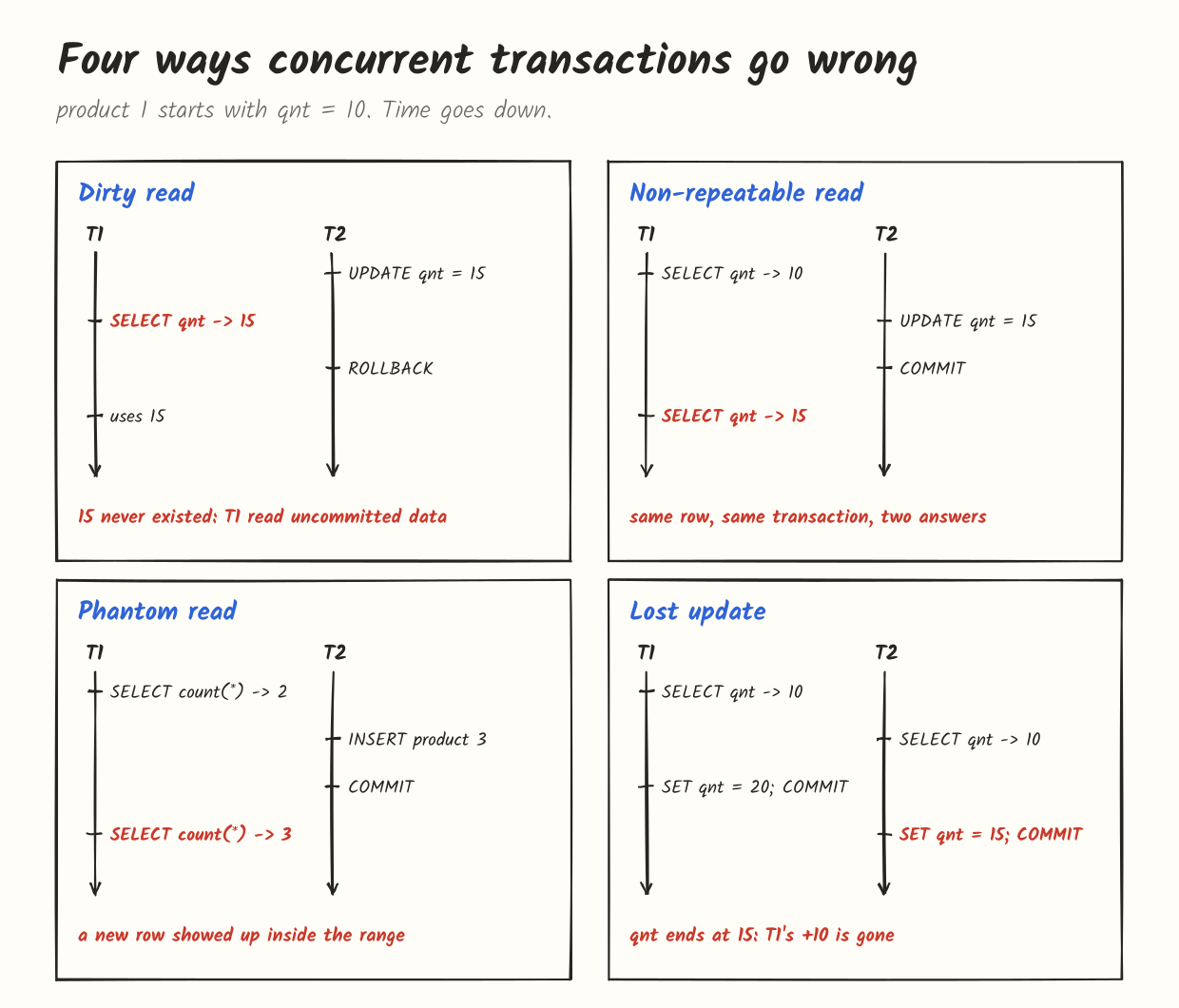
- Dirty read: you see another transaction’s changes before it commits. If it rolls back, you’ve acted on data that never existed.
- Non-repeatable read: you read the same row twice and get different values, because someone committed a change in between.
- Phantom read: you run the same range query twice and get a different set of rows, because someone inserted or deleted a row matching your
WHERE. - Lost update: two transactions read the same value, both compute a new one and write it back. The second write silently overwrites the first.
The standard’s four levels are defined by which of these they rule out:
| Level | Dirty read | Non-repeatable read | Phantom | Lost update |
|---|---|---|---|---|
| READ UNCOMMITTED | possible | possible | possible | possible |
| READ COMMITTED | no | possible | possible | possible |
| REPEATABLE READ | no | no | possible | no |
| SERIALIZABLE | no | no | no | no |
That’s the textbook table. It’s also the point where the textbook stops helping, because almost no database implements these levels the way the table implies. The standard was written with lock-based databases in mind, and most databases today use MVCC (multi-version concurrency control) and give each transaction a snapshot instead. A snapshot is a consistent view of the data as of some moment: you see everything committed before it and nothing after it, no matter how long you keep reading.
Snapshot isolation prevents dirty reads, non-repeatable reads and phantoms in plain reads. It doesn’t fit neatly into any row of the table. And whether it prevents lost updates depends on what the database does when you try to write a row that changed after your snapshot was taken. That one decision is most of the difference between the databases below.
Here’s the short version before the details:
| Postgres | MySQL | MariaDB | SQLite | |
|---|---|---|---|---|
| Default level | READ COMMITTED | REPEATABLE READ | REPEATABLE READ | SERIALIZABLE (the only real one) |
| READ UNCOMMITTED | same as READ COMMITTED | real dirty reads | real dirty reads | only with shared cache and a pragma |
| READ COMMITTED | new snapshot per statement | new snapshot per statement | new snapshot per statement | n/a |
| REPEATABLE READ | snapshot isolation, write conflicts fail | snapshot for reads, latest data for writes | like MySQL, but write conflicts fail since 11.6 | n/a |
| SERIALIZABLE | SSI, conflicts fail with 40001 | every read takes shared locks | every read takes shared locks | one writer at a time |
Postgres
Postgres’s default is READ COMMITTED. Each statement gets a fresh snapshot, so within one statement everything is consistent, but two statements in the same transaction can see different data.
When an UPDATE in READ COMMITTED finds a row that another transaction has changed and not yet committed, it waits. When the other transaction commits, Postgres doesn’t use the old version it started with. It re-reads the newest version of that row, checks the WHERE clause again, and applies the update to it. That’s why this is safe at the default level:
UPDATE sales SET qnt = qnt + 5 WHERE pid = 1;Two of those running at once will always add 10 in total. But the lost update from the diagram, where the application reads qnt first and then writes back a computed number, does lose a write at READ COMMITTED. Postgres can’t know that the 15 you’re writing was computed from a 10 that’s no longer true.
READ UNCOMMITTED is accepted but behaves exactly like READ COMMITTED. Postgres never shows you uncommitted data.
REPEATABLE READ in Postgres is snapshot isolation. The snapshot is taken at the first statement of the transaction (not at BEGIN) and used for everything after that. Unlike the standard’s version, it also prevents phantoms, because new rows committed after your snapshot are simply invisible. And if you try to update or delete a row that someone else changed and committed after your snapshot, you get an error instead of a silent overwrite:
ERROR: could not serialize access due to concurrent updateSERIALIZABLE in Postgres uses SSI (serializable snapshot isolation), added in 9.1. It’s snapshot isolation plus tracking of who read what. When Postgres detects a pattern of reads and writes between concurrent transactions that couldn’t happen in any serial order, it aborts one of them with SQLSTATE 40001. It doesn’t block readers, so it performs surprisingly well, but you must be ready to retry transactions. That goes for REPEATABLE READ too.
MySQL
MySQL’s default is REPEATABLE READ, and it’s a strange hybrid that trips people up.
Plain SELECT statements are consistent reads: they read from a snapshot taken at the first read of the transaction (or at START TRANSACTION WITH CONSISTENT SNAPSHOT). So far this is like Postgres.
But UPDATE, DELETE, SELECT ... FOR UPDATE and SELECT ... FOR SHARE are locking reads, and they don’t use the snapshot at all. They read the latest committed version of each row and lock it. If another transaction changed the row after your snapshot, MySQL doesn’t complain. It just updates the newest version. That’s why the read-then-write lost update goes through without any error at MySQL’s default level.
It also leads to this, which is documented behaviour and not a bug:
-- session A
START TRANSACTION;
SELECT count(*) FROM sales WHERE pid = 3;    -- 0

-- session B inserts pid 3 and commits

-- session A
SELECT count(*) FROM sales WHERE pid = 3;    -- still 0, snapshot
UPDATE sales SET qnt = 0 WHERE pid = 3;      -- 1 row affected
SELECT count(*) FROM sales WHERE pid = 3;    -- 1
The row was invisible to the SELECT, but the UPDATE found it and changed it, and after that it’s visible because your own transaction touched it.
To keep locking reads from seeing phantoms, InnoDB uses next-key locks: it locks the index records it scans and the gaps between them, so nobody can insert into the range you’ve read with a locking read. Gap locks are the reason MySQL at REPEATABLE READ sometimes deadlocks on inserts that don’t seem to touch the same rows. A lot of MySQL shops switch to READ COMMITTED for exactly that reason, since it turns off most gap locking.
The fix for lost updates in MySQL is to read with a lock when you plan to write:
START TRANSACTION;
SELECT qnt FROM sales WHERE pid = 1 FOR UPDATE;   -- others wait here
UPDATE sales SET qnt = 20 WHERE pid = 1;
COMMIT;
Or do the arithmetic in SQL, with SET qnt = qnt + 10, so the read and the write are the same statement.
READ UNCOMMITTED in MySQL really does give you dirty reads. SERIALIZABLE is implemented with locks: with autocommit off, every plain SELECT is quietly turned into SELECT ... FOR SHARE. Readers block writers and writers block readers, which is correct but can be slow under contention.
MariaDB
MariaDB forked from MySQL in 2009 and uses its own version of InnoDB. For most of that time its isolation behaved like MySQL’s, including the silent lost update at REPEATABLE READ.
That changed recently. MariaDB added a variable called innodb_snapshot_isolation in 10.6.18, 10.11.8 and 11.4.2, turned off by default. From 11.6.2 it’s on by default, which means the 11.8 LTS release has it on. With it on, a locking read or write at REPEATABLE READ that hits a row changed after your snapshot fails instead of silently using the newer version:
ERROR 1020 (HY000): Record has changed since last read in table 'sales'So MariaDB 11.8’s REPEATABLE READ now behaves much more like Postgres’s. That’s a real improvement, but it’s also a behaviour change: code that ran fine on MariaDB 10.x can start getting error 1020 after an upgrade, and it needs a retry loop just like Postgres code does. You can turn it off per session if you need the old behaviour while you fix things.
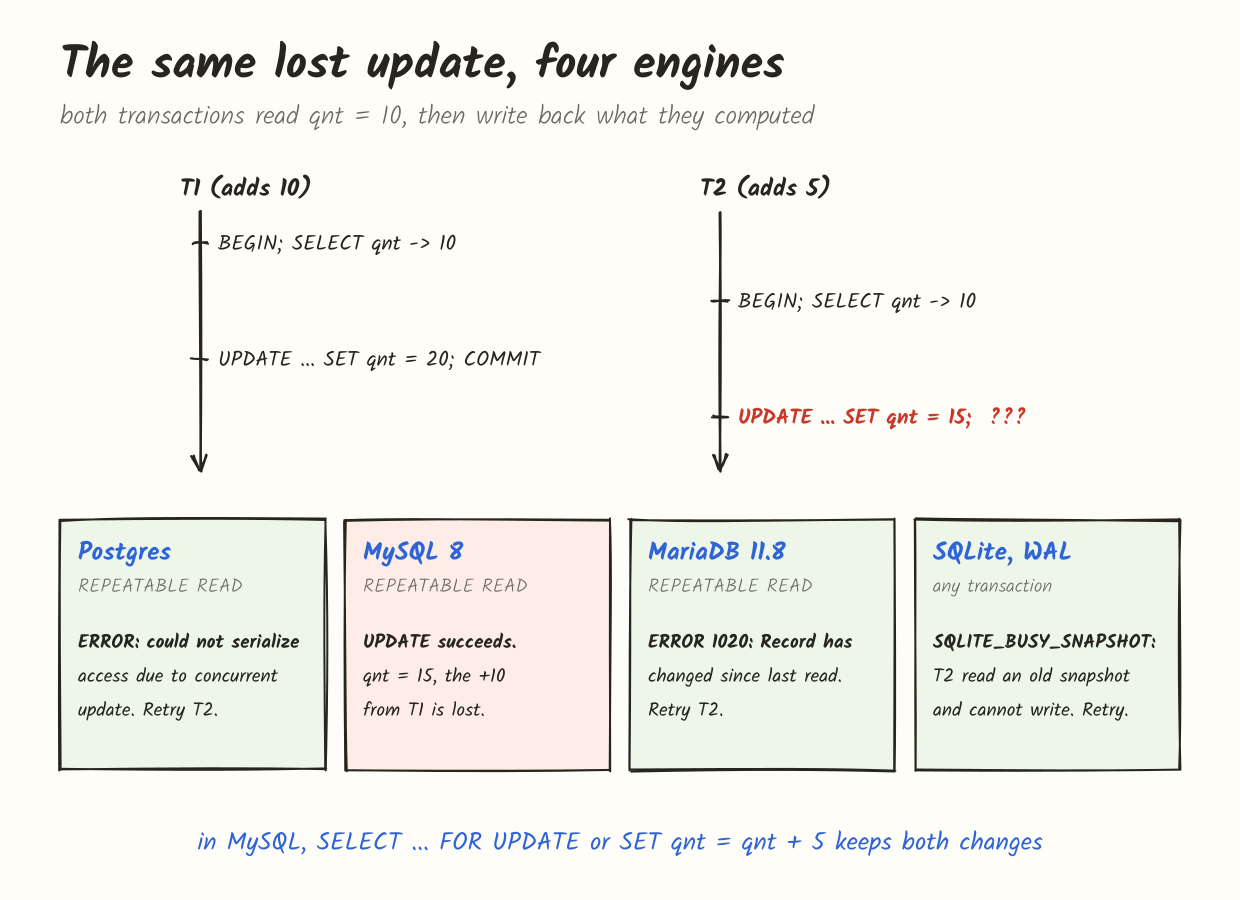
Remember that this picture is at REPEATABLE READ. At Postgres’s default level, READ COMMITTED, T2’s update goes through and T1’s change is lost, just like in MySQL. So with default settings, both Postgres and MySQL will lose this update. They just have different defaults and different ways to stop it.
SQLite
SQLite’s isolation story is the simplest of the four, because only one connection can write at a time. There are no row locks. There’s a lock on the whole database.
A transaction starts as a reader when it begins with a plain BEGIN (which means BEGIN DEFERRED). On its first write it tries to become the writer. If another connection is already writing, it gets SQLITE_BUSY, or waits up to busy_timeout milliseconds if you’ve set one.
In rollback journal mode, readers and the writer also block each other: the writer can’t commit while anyone is reading, because it needs an exclusive lock to write to the database file.
In WAL mode, readers never block the writer and the writer never blocks readers. Each reader sees a snapshot: the database file plus the WAL up to the last commit that existed when the read started. This is also where the lost update gets caught. If your transaction read something and then tries to write, but another connection committed after your snapshot, SQLite can’t let you write on top of stale data. You get SQLITE_BUSY_SNAPSHOT, and waiting doesn’t help, because your snapshot will never become fresh. You have to roll back and start over.
The usual fix is to start transactions that will write with BEGIN IMMEDIATE. That grabs the write lock up front, so the reads inside it can’t go stale:
BEGIN IMMEDIATE;
SELECT qnt FROM sales WHERE pid = 1;
UPDATE sales SET qnt = 20 WHERE pid = 1;
COMMIT;
Because there’s only one writer, SQLite transactions are serializable. PRAGMA read_uncommitted exists, but it only has an effect between connections sharing a cache in the same process, which is a mode you’re unlikely to be using.
Write skew: where snapshot isolation isn’t enough
Snapshot isolation stops lost updates, when the two transactions write the same row. It doesn’t stop write skew, when they read the same data and write different rows.
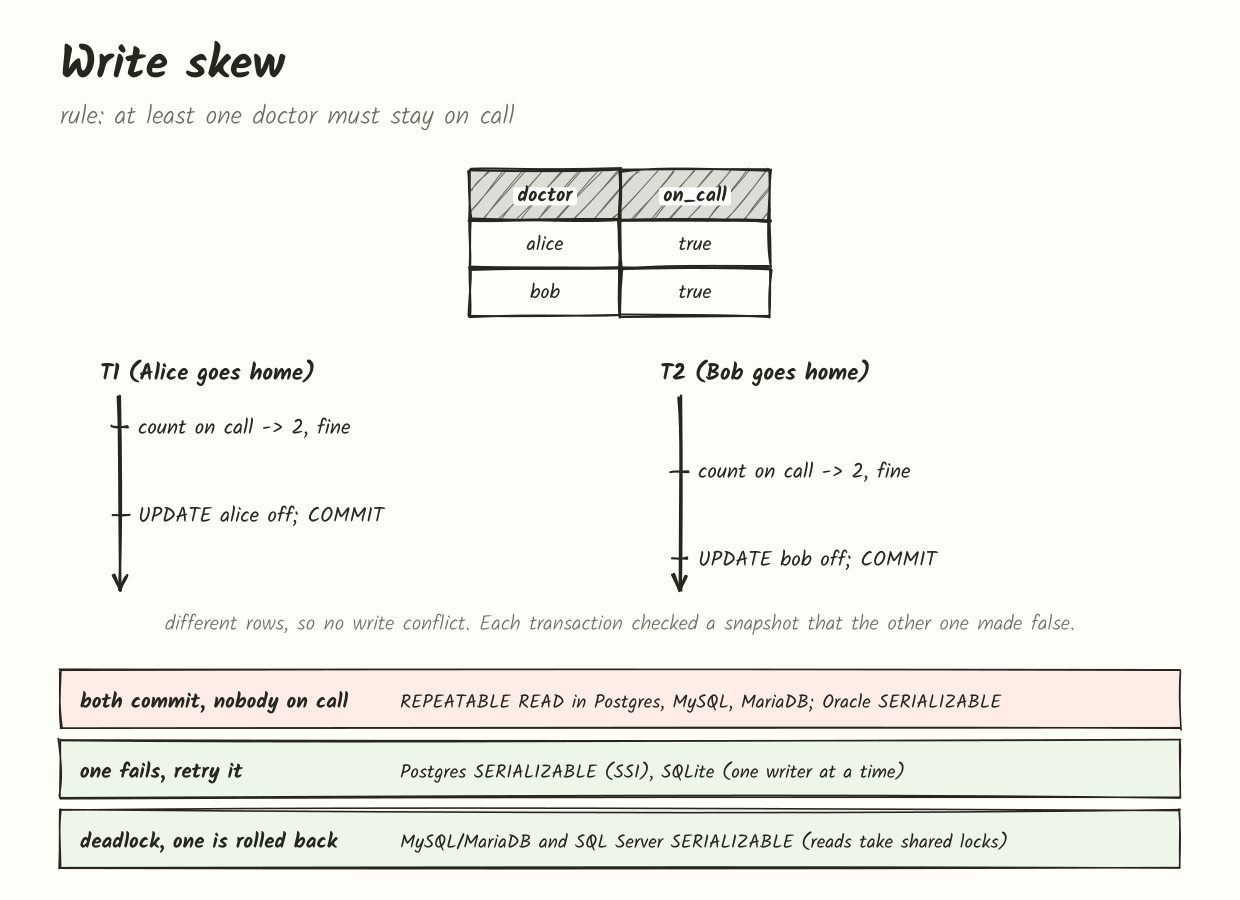
Each transaction checks the rule against its snapshot, and each one is right about its snapshot. Neither sees the other’s write. No row was written twice, so there’s no conflict to detect, and both commit.
To prevent this you need real serializability, or an explicit lock on the rows you based your decision on. In Postgres, SERIALIZABLE catches it and fails one transaction. In MySQL and MariaDB you can use SERIALIZABLE, or read the rows with SELECT ... FOR UPDATE so the second transaction has to wait for the first. SQLite is safe by construction, since only one of the two can write, and the other one’s snapshot goes stale.
This matters beyond hospital rotas. Booking systems (no double booking of a room), inventory (don’t sell more than you have), usernames (check it’s free, then insert) all have the same shape: read, decide, write something else. A unique constraint handles the username case. For the others you either need serializable or a lock.
A word on SQL Server and Oracle
Both use the same level names and mean something different again.
SQL Server’s default READ COMMITTED is lock-based: readers take short shared locks, so they wait for writers. Turning on READ_COMMITTED_SNAPSHOT for the database switches it to a snapshot per statement, like Postgres, and that’s on by default in Azure SQL Database. There’s also a separate SNAPSHOT level that’s snapshot isolation per transaction, which fails on write conflicts. Its REPEATABLE READ and SERIALIZABLE are lock-based, and WITH (NOLOCK) hints, which you’ll see all over older codebases, are READ UNCOMMITTED with real dirty reads.
Oracle only offers READ COMMITTED (the default) and SERIALIZABLE. It never allows dirty reads. And Oracle’s SERIALIZABLE is actually snapshot isolation: it fails with ORA-08177: can't serialize access for this transaction on write conflicts, but it allows write skew. If you port code from Oracle to Postgres and keep SERIALIZABLE, you’ll get a stronger guarantee than you had.
The lesson from all of this: the name of an isolation level tells you very little. What you need to know is how your database behaves when a transaction writes a row that changed after it last looked.
Consistency
Consistency is the odd one out. Atomicity, isolation and durability are things the database does. Consistency is mostly about your rules: a balance can’t be negative, every order has a customer, the like count matches the number of likes. The database helps in two ways. It enforces the rules you tell it about through constraints, and it gives you atomicity and isolation so that your transactions can move the data from one valid state to another without anyone seeing the steps in between.
Here’s a schema where things can go wrong:
CREATE TABLE pictures (
  id    int PRIMARY KEY,
  blob  bytea,
  likes int NOT NULL DEFAULT 0
);

CREATE TABLE picture_likes (
  user_name  text,
  picture_id int REFERENCES pictures(id),
  PRIMARY KEY (user_name, picture_id)
);
There are two things to keep true. likes should equal the number of rows in picture_likes for that picture, and every like should point to a picture that exists. The second one is a foreign key, and the database checks it for you. The first one lives only in your head. If a “like” does the INSERT and the UPDATE ... SET likes = likes + 1 in separate transactions and crashes in between, the count drifts, and no constraint will catch it. That’s the job of the transaction: put both statements in one, and atomicity makes them happen together.
Where the four databases really differ is how much of your schema they actually enforce.
Foreign keys. Postgres, MySQL and MariaDB (with InnoDB) enforce them. SQLite doesn’t, by default. Foreign key enforcement is off for backwards compatibility, and you have to turn it on for every connection:
PRAGMA foreign_keys = ON;It’s a per-connection setting, not saved in the file. If one part of your app forgets it, that part can insert likes for picture 4 that doesn’t exist. MySQL also lets you switch them off with SET foreign_key_checks = 0 (bulk loads and dump files do this), and when you switch them back on, the existing rows are not re-checked.
CHECK constraints. Postgres and SQLite have always enforced them. MySQL parsed them and silently ignored them until 8.0.16 (2019). You could write CHECK (balance >= 0), get no error, and then insert a negative balance. MariaDB has enforced them since 10.2.1. If you’re on an older MySQL, or your schema came from one, don’t assume your checks were ever checked.
Types. Postgres rejects 'abc' in an integer column. MySQL and MariaDB do too, but only in strict mode, which is the default in MySQL 5.7+ and MariaDB 10.2.4+. Without strict mode, the value becomes 0 with a warning, and too-long strings are cut off. Old applications sometimes turn strict mode off because they break without it, which is worth knowing when you inherit one. SQLite uses flexible typing: a column declared INTEGER will happily store the text 'abc'. Since 3.37 you can declare a table STRICT to get real type checking:
CREATE TABLE account (
  id      INTEGER PRIMARY KEY,
  balance INTEGER NOT NULL CHECK (balance >= 0)
) STRICT;
When constraints are checked. Normally a constraint is checked immediately, row by row. Sometimes you need it checked at commit instead, for example two rows that point at each other, or swapping two values in a unique column. Postgres supports DEFERRABLE INITIALLY DEFERRED on foreign key, unique, primary key and exclusion constraints. SQLite supports it on foreign keys. MySQL and MariaDB don’t support deferred constraints at all, so there you have to order your statements carefully, or disable checks.
Consistency in reads
There’s a second meaning of “consistency” that has nothing to do with the C in ACID, but it causes just as many bugs. If a transaction has committed, will the next read see it?
On a single server, yes. Once COMMIT returns, every new transaction sees the change. But almost every production setup adds replicas to spread the read load, and replication is usually asynchronous.
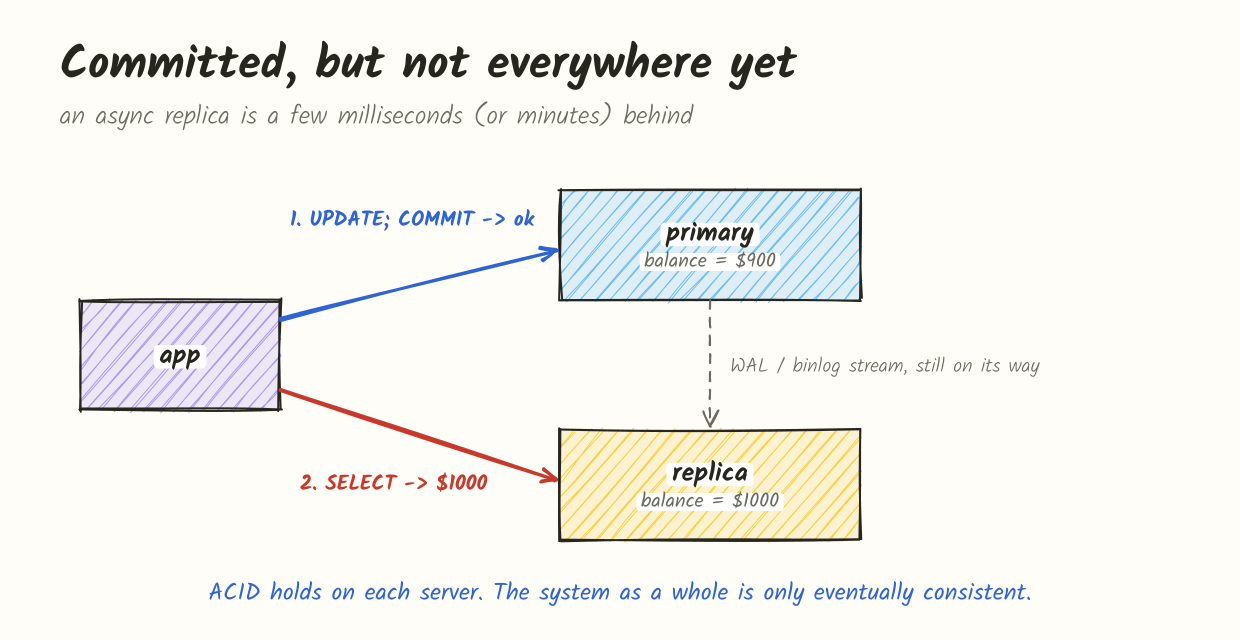
The primary has committed. The replica hasn’t received the change yet. The user updates their profile, the page reloads, and the old profile is back. Nothing is broken, and the replica will catch up in a few milliseconds, or a few minutes if it’s struggling. This is eventual consistency, and relational databases have it as soon as you read from replicas, just like NoSQL systems do.
The usual fixes are:
- Read from the primary for a short while after a user writes something (read-your-writes).
- Track the position of the last write (a WAL LSN in Postgres, a GTID in MySQL and MariaDB) and only read from a replica that has reached it. MySQL has
WAIT_FOR_EXECUTED_GTID_SET()for this, and Postgres haspg_last_wal_replay_lsn()to compare against. - Use synchronous replication. In Postgres,
synchronous_commit = remote_applywith a synchronous standby meansCOMMITdoesn’t return until the standby has applied the change and it’s visible there. MySQL’s semi-synchronous replication only waits for a replica to receive the change, not apply it, so it protects against losing data but not against stale reads.
SQLite has no built-in replication, so this doesn’t come up unless you add a tool on top.
Durability
Durability means that once COMMIT returns, the change survives a crash: the database process dying, the OS crashing, the power going out.
The simple way would be to write every changed page to its place in the data files at commit time. That’s slow: a transaction might touch a table page and five index pages spread all over the disk, and each one is a random write. So every database here does the same trick. At commit, it writes a compact description of the change to a log, sequentially, and makes sure that’s on disk. The data pages are written later, in the background. After a crash, the log is replayed to redo anything the data files missed. The log is called WAL in Postgres, the redo log in InnoDB, and the journal or WAL in SQLite.
“Makes sure it’s on disk” is where it gets interesting. When a program calls write(), the data usually just goes into the operating system’s page cache in memory. It reaches the disk whenever the OS decides. To force it, the database calls fsync() (or fdatasync()), which returns only when the OS and the drive say the data is stored. That’s the slow part of a commit, and every database gives you ways to skip it.
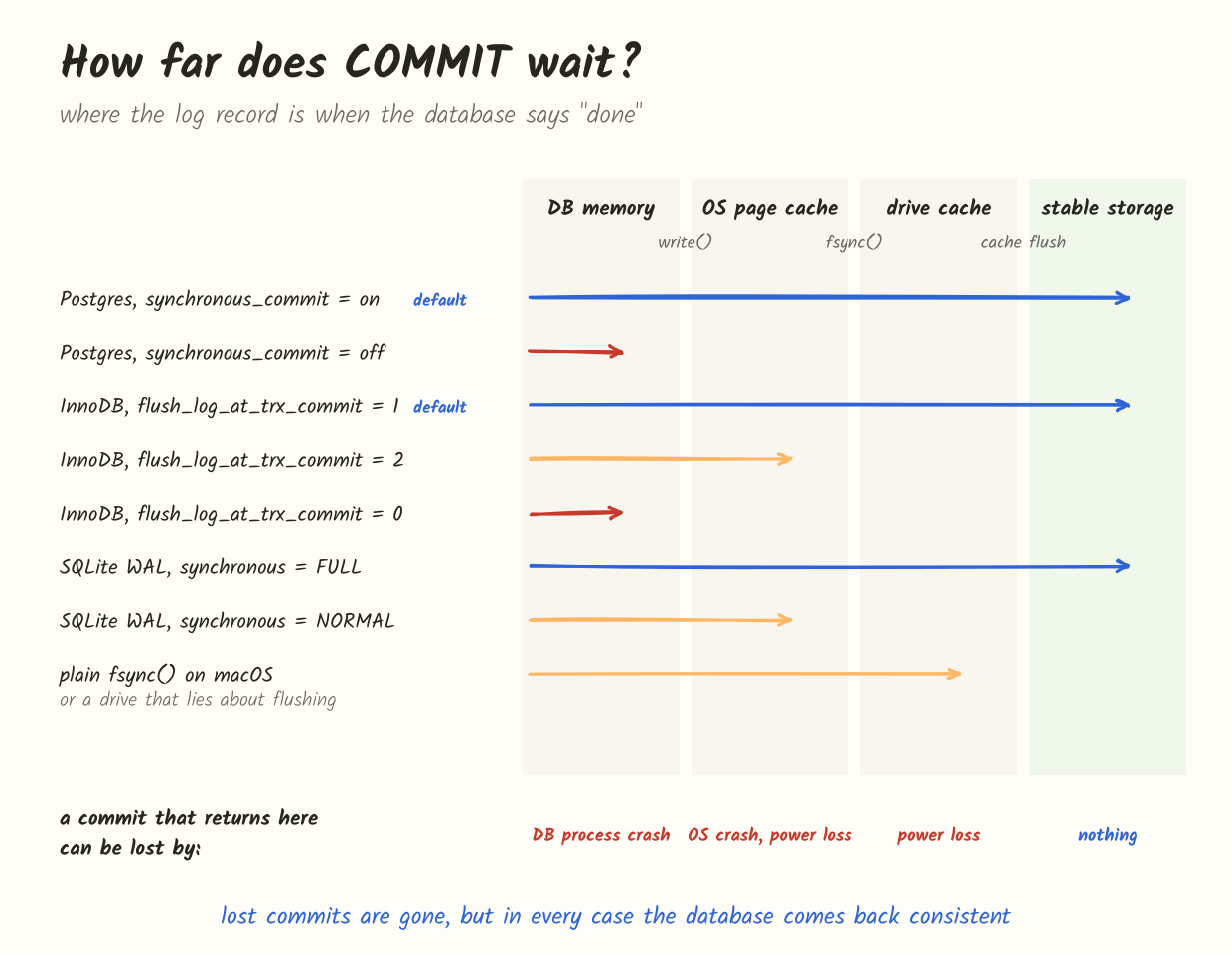
The important thing in that picture: in each of those settings, the database stays consistent after a crash. What you lose is the last few commits. They’re gone, as if they never happened, but you won’t get corruption or half a transaction. So these settings trade durability for speed, and for a lot of data (sessions, caches, analytics events) that’s a fine trade to make on purpose.
Postgres waits for the WAL flush by default. You can relax it per transaction:
SET LOCAL synchronous_commit = off;Then COMMIT returns before the WAL is flushed, and a crash can lose up to three times wal_writer_delay worth of commits (600 ms with the default). It’s a nice tool because you can use it only for unimportant writes. Don’t confuse it with fsync = off, which is a different thing: it stops Postgres from syncing anything, including data files, and an OS crash can then leave you with a corrupted database, not just missing transactions. It’s only for throwaway test databases.
Postgres also learned a hard lesson here. In 2018 it turned out that on Linux, if fsync() fails, the kernel can drop the dirty pages and the next fsync() succeeds, so a retry would silently lose data. Since the 2019 releases, Postgres treats a failed fsync() as a reason to crash and recover from WAL, instead of retrying.
InnoDB is controlled by innodb_flush_log_at_trx_commit:
1(default): write and flush the redo log at every commit. Fully durable.2: write to the OS at every commit, flush about once per second. Survives a MySQL crash, but an OS crash or power loss can lose about a second of commits.0: write and flush about once per second. Even a MySQL crash can lose about a second.
If the binary log is enabled (on by default in MySQL 8, off by default in MariaDB), there’s a second log to worry about. The commit is a two-phase process between the binlog and the redo log, and for them to agree after a crash you want sync_binlog = 1 as well, which is the default in MySQL since 5.7. People call innodb_flush_log_at_trx_commit = 1 plus sync_binlog = 1 “double 1”, and it’s what you want on a primary. With looser settings, a crash can leave a transaction in the binlog but not in InnoDB, or the other way round, and your replicas will disagree with the primary.
InnoDB also has the doublewrite buffer. A 16 KB page is bigger than what the disk writes atomically, so a crash in the middle of writing a page can leave it half old and half new. InnoDB writes each page to a doublewrite area first, so a torn page can be restored from there. Postgres solves the same problem with full_page_writes, which puts a full copy of a page into the WAL the first time it changes after each checkpoint.
SQLite has PRAGMA synchronous, and its meaning depends on the journal mode. The SQLite docs have a small table for this, and it’s worth knowing:
| Rollback journal | WAL | |
|---|---|---|
| EXTRA | ACID | ACID |
| FULL | maybe not durable | ACID |
| NORMAL | maybe not consistent | maybe not durable |
| OFF | not consistent | not consistent |
The default is FULL. In WAL mode that’s fully durable. The popular recommendation of WAL mode with synchronous = NORMAL is consistent but not durable: the WAL is only synced at checkpoints, so a power cut can roll back the last few commits. For most apps that’s a good trade. In rollback journal mode, even FULL has a small gap, because committing means deleting the journal, and that deletion isn’t synced to the directory. After a power loss the journal can come back, and SQLite will “recover” by rolling back a transaction you thought was committed. EXTRA closes that gap.
macOS deserves a special mention. On macOS, fsync() sends data to the drive but doesn’t ask the drive to flush its own cache. To really get data onto stable storage you need fcntl(F_FULLFSYNC). SQLite has PRAGMA fullfsync, which is off by default. Postgres has wal_sync_method = fsync_writethrough, which isn’t the default either. Your laptop is fine for development, but don’t assume it’s durable.
Drives can lie too. Consumer SSDs without power loss protection sometimes report a flush as done while the data is still in volatile cache. No database setting can fix that. It’s one of the reasons production databases run on hardware (or cloud disks) with proper power loss protection.
A note on MongoDB
Since “ACID” is also used as a selling point by non-relational databases, it’s worth a quick look at the most common one. In MongoDB, a write to a single document has always been atomic, and multi-document transactions have existed since 4.0 (replica sets) and 4.2 (sharded clusters), with snapshot isolation. Durability is a question of write concern: since 5.0 the default is w: "majority", so a write is acknowledged once most of the replica set has it. Reads have a separate read concern, and reading from secondaries has exactly the replica lag problem from above. The pattern is the same as everywhere else: the guarantees are there, and the defaults and knobs decide how much of them you get.
Try it yourself
The fastest way to understand all this is to open two terminals and race two transactions. Here’s the lost update in Postgres:
-- terminal 1                              -- terminal 2
BEGIN ISOLATION LEVEL REPEATABLE READ;
SELECT qnt FROM sales WHERE pid = 1;
--  10
                                           BEGIN ISOLATION LEVEL REPEATABLE READ;
                                           SELECT qnt FROM sales WHERE pid = 1;
                                           --  10
UPDATE sales SET qnt = 20 WHERE pid = 1;
COMMIT;
                                           UPDATE sales SET qnt = 15 WHERE pid = 1;
                                           -- ERROR:  could not serialize access
                                           --         due to concurrent update
Now run the same thing with BEGIN ISOLATION LEVEL READ COMMITTED. The second UPDATE succeeds and qnt ends up 15.
In MySQL, use SET TRANSACTION ISOLATION LEVEL REPEATABLE READ; START TRANSACTION; in each terminal. The second UPDATE succeeds. On MariaDB 11.8 it fails with error 1020. Then try SET SESSION innodb_snapshot_isolation = OFF on MariaDB and watch it behave like MySQL again.
For SQLite, open the same file in two sqlite3 shells, run PRAGMA journal_mode = WAL; once, and do the same read, write, commit dance with BEGIN; in both. The second UPDATE fails with database is locked, which is SQLITE_BUSY_SNAPSHOT underneath, and setting .timeout won’t make it go away. Then try it with BEGIN IMMEDIATE; in both. Now the second shell is stopped at BEGIN IMMEDIATE itself, before it has read anything, and once the first one commits it can go ahead and read the fresh value.
Summary
| SQLite | Postgres | MySQL (InnoDB) | MariaDB (InnoDB) | |
|---|---|---|---|---|
| Error inside a transaction | statement undone, transaction continues | whole transaction aborted | statement undone, transaction continues | statement undone, transaction continues |
| Transactional DDL | yes | yes | no, implicit commit | no, implicit commit |
| How rollback works | journal pages copied back, or WAL frames ignored | mark transaction aborted in pg_xact | apply undo log | apply undo log |
| Default isolation | serializable (one writer) | READ COMMITTED | REPEATABLE READ | REPEATABLE READ |
| Write conflict at REPEATABLE READ | SQLITE_BUSY_SNAPSHOT | error, retry | silently uses newest row | error 1020 (default since 11.6.2) |
| SERIALIZABLE | one writer at a time | SSI, retry on 40001 | shared locks on reads | shared locks on reads |
| Foreign keys | off unless PRAGMA foreign_keys = ON | enforced | enforced (can be switched off) | enforced (can be switched off) |
| CHECK constraints | enforced | enforced | enforced since 8.0.16 | enforced since 10.2.1 |
| Deferred constraints | foreign keys only | yes | no | no |
| Log | rollback journal or WAL | WAL | redo + undo (+ binlog) | redo + undo (+ binlog) |
| Relaxed durability | synchronous = NORMAL | synchronous_commit = off | innodb_flush_log_at_trx_commit = 0/2 | innodb_flush_log_at_trx_commit = 0/2 |
- A transaction is all or nothing, but “nothing” after an error only happens automatically in Postgres. In MySQL, MariaDB and SQLite, your code has to roll back.
- Postgres keeps old row versions in the table and undoes by marking a transaction aborted. InnoDB changes rows in place and keeps the old values in undo. SQLite saves original pages in a journal, or writes new ones to a WAL.
- Isolation level names don’t mean the same thing across databases. The question to ask is what happens when you write a row that changed after your snapshot: Postgres and new MariaDB fail, MySQL uses the new row, SQLite never lets two writers in.
- Snapshot isolation stops lost updates but not write skew. For “check, then write something else” logic, use SERIALIZABLE or lock what you read.
- Consistency is mostly your job. Check that your database actually enforces the constraints you wrote, especially SQLite foreign keys and old MySQL
CHECKs. - Durability depends on a few settings and on the hardware. Relaxing it loses recent commits, not consistency, and that’s sometimes exactly the right trade.
- Code that runs at REPEATABLE READ or SERIALIZABLE in Postgres, or on MariaDB 11.8, needs a retry loop. It’s not optional.